



What makes a website easy to use? Why do some websites immediately feel simple while others make visitors search for everything?
The answer often comes down to UI/UX design.
A good website doesn’t only need attractive visuals. Visitors should be able to understand what a business offers, find the information they need, navigate between pages, complete forms, and take action without unnecessary friction. UX guidance from India’s government UX standards also highlights usability, clarity, consistency, navigation, accessibility, error recovery, and responsiveness as important parts of effective digital experiences.
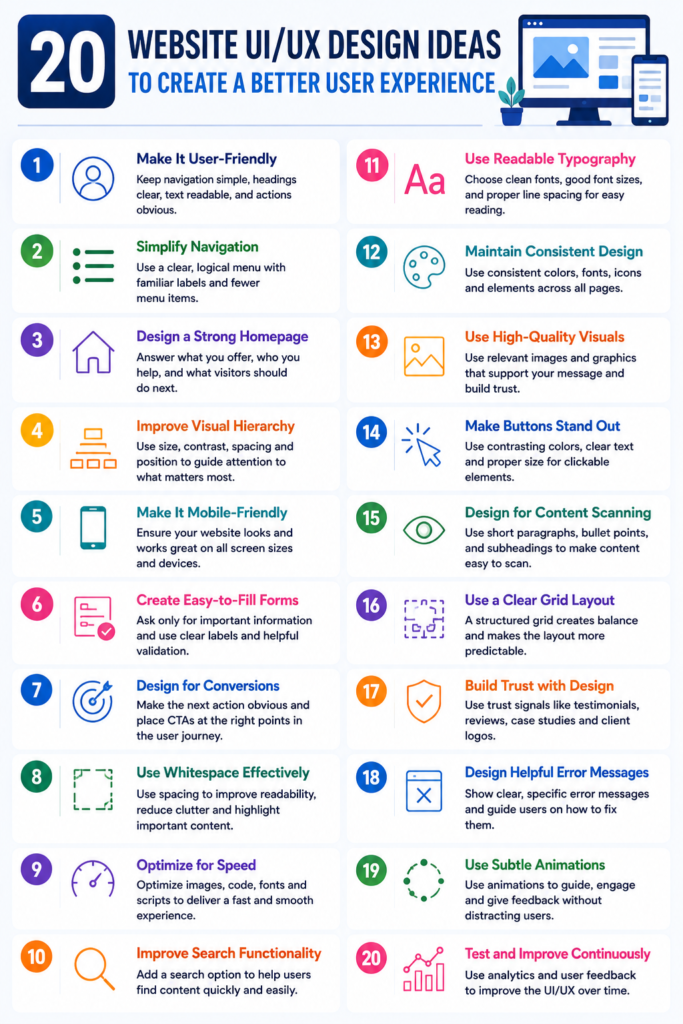
If you’re planning a new website or redesigning an existing one, here are 20 practical website UI/UX design ideas based around the questions users and businesses commonly ask.
1. What Makes a Website User-Friendly?
A user-friendly website makes it easy for visitors to understand the content and complete their intended task.
Start with:
- Simple navigation
- Clear headings
- Readable typography
- Logical page structure
- Visible CTAs
- Consistent design
- Fast interactions
The goal is simple: users shouldn’t have to figure out how your website works.
For businesses building a new website, professional UI/UX Design Services can help turn these principles into a structured interface.
2. How Can I Make My Website Navigation Easier?
Ask yourself: Can a first-time visitor find an important page within a few clicks?
Keep the main navigation focused on the pages visitors actually need. Use familiar labels such as:
- Home
- About
- Services
- Products
- Case Studies
- Blog
- Contact
Avoid complicated terminology that forces visitors to guess where a link will take them.
3. How Should a Website Homepage Be Designed?
Your homepage should answer three questions quickly:
What do you offer? Who do you help? What should I do next?
A strong hero section can include:
- A clear headline
- Short supporting copy
- Primary CTA
- Relevant visual
- Trust signal
Instead of filling the first screen with multiple messages, give visitors one clear direction.
4. How Can I Improve My Website’s Visual Hierarchy?
Visual hierarchy tells visitors what deserves their attention first.
You can create hierarchy through:
- Heading sizes
- Font weights
- Spacing
- Contrast
- Position
- Images
- Button styles
For example, the main CTA should generally have more visual emphasis than a secondary navigation link.
5. Why Is Mobile-Friendly UI/UX Important?
Have you ever opened a website on your phone and struggled to click a button or read the text?
That’s a UX problem.
A responsive interface should adapt navigation, content, forms, images, buttons, and layouts to different screen sizes.
If you’re planning a new responsive business website, explore AppsTechy’s Website Development Services for an end-to-end approach to website design and development.
6. How Can I Make Website Forms Easier to Complete?
Long forms can create unnecessary friction.
Ask only for information you actually need.
For example, a basic project inquiry may require:
- Name
- Phone
- Project requirement
Use clear labels, helpful validation, and specific error messages rather than simply displaying “Invalid input.”
7. How Can Website Design Increase Conversions?
Good UI/UX should make the next action obvious.
Depending on your business, that could mean:
Get a Quote → Book a Demo → Buy Now → Call Us → Contact Our Team
Place CTAs where they naturally match the visitor’s decision-making process.
A beautiful page without a clear next step can still produce poor business results.
8. How Much Whitespace Should a Website Have?
There is no universal percentage of whitespace.
Instead, use spacing to separate related content and make important information easier to scan.
Whitespace can improve:
- Readability
- Visual hierarchy
- Content scanning
- Focus
- Overall interface clarity
A crowded website can make even useful information feel difficult to consume.
9. How Can I Make My Website Load Faster?
A beautiful interface becomes frustrating when visitors have to wait for it.
Review:
- Image sizes
- JavaScript
- CSS
- Fonts
- Third-party scripts
- Animations
- Server performance
- Caching
UI/UX and website performance should be considered together because responsiveness and performance are part of the overall user experience.
Businesses can also explore website speed optimization services when performance becomes a major UX issue.
10. What Website Design Elements Build Trust?
Visitors often look for signals that a business is legitimate before contacting or purchasing from it.
Useful trust elements include:
- Client testimonials
- Case studies
- Certifications
- Reviews
- Security information
- Contact details
- Team information
- Industry experience
Place these elements close to relevant decision points instead of hiding them on one page.
11. How Can I Improve Website Accessibility?
Can someone navigate your website using only a keyboard? Can visitors read the text easily? Do meaningful images have appropriate alternative text?
Accessibility should be part of the design process.
Consider:
- Color contrast
- Keyboard navigation
- Focus states
- Readable typography
- Descriptive labels
- Alternative text
- Logical headings
Accessibility also improves usability for people without disabilities in many situations.
12. Should I Add Search to My Website?
If your website contains a large amount of content, products, documentation, or resources, search can become an important part of UX.
A useful website search should provide:
- Autocomplete
- Relevant results
- Spelling assistance
- Filters where appropriate
- Helpful zero-result messages
Search UX guidance recommends making the search scope clear and helping users recover when their query produces no useful results.
13. How Can Breadcrumbs Improve Website UX?
Breadcrumbs show users where they are within your website.
For example:
Home → Services → UI/UX Design → Website UI/UX
They are especially useful for websites with multiple categories or levels of content.
14. What Are Microinteractions in Web Design?
Microinteractions are small responses that tell users something happened.
Examples include:
- Button hover effects
- Loading indicators
- Form confirmation
- Progress indicators
- Success notifications
- Menu transitions
The purpose isn’t to add animation everywhere. It is to provide useful feedback and make interactions feel responsive.
15. How Can I Improve Website Error Messages?
A generic message such as “Something went wrong” leaves users confused.
Instead, explain:
What happened + what the user should do next.
For example:
“Your payment couldn’t be processed. Please check your card details and try again.”
Good error handling is a core usability principle because it helps users recover rather than reach a dead end.
16. How Can Personalization Improve Website UX?
Personalization can make an experience more relevant.
Depending on the website, you could show:
- Recommended products
- Recently viewed content
- Location-based information
- Personalized dashboards
- Relevant service suggestions
However, personalization should be useful rather than intrusive.
17. How Should I Design a Website CTA?
A CTA should clearly communicate what happens after the click.
Compare:
Submit
with:
Get My Free Website Consultation
The second option gives visitors more context.
Use action-oriented language that matches the user’s intent.
18. How Can Case Studies Improve Website UX?
Case studies can answer questions visitors may have before contacting your company.
For example:
Problem → Solution → Technology → Result
This is especially useful for software development and technology companies.
AppsTechy’s NexoPD case study and HRMS Connect case study can serve as examples of how project outcomes can be presented as part of a business website experience.
19. How Do I Know If My Website UX Is Actually Working?
Don’t judge UX only by appearance.
Look at measurable signals such as:
- Conversion rate
- Form completion
- Engagement
- Search usage
- Exit pages
- Mobile behavior
- Page performance
- User feedback
Usability testing can also identify problems that analytics alone may not reveal.
The important question is:
Can users complete their goals easily?
20. How Often Should I Improve My Website UI/UX?
UX shouldn’t be treated as a one-time project.
Review your website when:
- Your business changes
- New services are added
- User behavior changes
- Conversion rates decline
- Mobile traffic increases
- Technology changes
- Customers report usability problems
Continuous testing and improvement can help keep the experience aligned with user expectations.
What Is the Difference Between UI and UX Design?
A common question is: Are UI and UX the same thing?
Not exactly.
UI (User Interface) focuses on the visual and interactive elements users see—such as buttons, typography, colors, layouts, and forms.
UX (User Experience) covers the broader experience of using the website, including navigation, usability, accessibility, information architecture, and the user’s journey.
In simple terms:
UI = How the website looks and responds.
UX = How easy and satisfying the website is to use.
A successful website needs both.
What Should a Good Website UI/UX Design Include?
A strong website experience typically combines:
- Clear information architecture
- Simple navigation
- Responsive design
- Consistent visual language
- Accessible interfaces
- Fast performance
- Clear CTAs
- Useful forms
- Trust signals
- Helpful feedback
- Continuous testing
The objective isn’t to follow every design trend. It’s to create an interface that helps visitors accomplish their goals with minimum friction.
FAQs About Website UI/UX Design
What are the most important website UX principles?
Clarity, usability, consistency, accessibility, responsiveness, easy navigation, and efficient task completion are among the most important principles.
How can I improve my website UX?
Start by identifying where users experience friction. Review navigation, forms, mobile usability, page speed, content structure, CTAs, accessibility, and conversion paths.
What makes a website design modern?
A modern website typically combines clean visual design with responsive layouts, intuitive navigation, fast performance, accessibility, meaningful interactions, and clear content.
Is UI or UX more important for a website?
Neither works effectively in isolation. UI creates the interface users interact with, while UX ensures the overall journey is useful and intuitive.
When should I hire a UI/UX design company?
Consider professional UI/UX support when you’re launching a new website, redesigning an outdated site, building a SaaS product, developing a web application, or experiencing usability and conversion problems.
Final Thoughts
The best website UI/UX design isn’t necessarily the most complicated or visually impressive. It is the design that helps users understand, navigate, interact, and convert without unnecessary effort.
From mobile-first layouts and simple navigation to accessible interfaces, useful search, better forms, faster performance, and continuous testing, these 20 ideas can provide a practical foundation for improving your website experience.
If you’re planning a new website or redesign, you can explore AppsTechy’s UI/UX Design Services or its Website Development Services to create a website built around both user needs and business goals. Have a website project in mind? Contact Us today to discuss your requirements and get started with the right UI/UX and development approach.