

What if your business application could do more than store information?
Instead of employees manually checking emails, updating records, approving requests, creating reports, or moving information between systems, a custom business application can automate many of these repetitive processes.
Modern intelligent automation combines traditional workflow rules, APIs, data, artificial intelligence, and—increasingly—AI agents to help applications respond to business conditions and complete defined tasks. The shift in 2026 is moving from isolated task automation toward connected, end-to-end workflows that combine automation with human oversight.
Here are 10 intelligent automation ideas for custom business applications and the business questions they can help answer.
1. How Can a Business Application Automatically Qualify New Leads?
Sales teams often spend significant time reviewing enquiries and deciding which leads deserve immediate attention.
A custom application can automate the first stage of lead qualification.
For example, when a new enquiry arrives, the system can:
- Capture the lead automatically
- Extract important information
- Identify the requested service
- Score the lead
- Assign it to the appropriate salesperson
- Create a CRM record
- Trigger a follow-up notification
AI can also analyze the content of an enquiry and identify potential buying intent.
Instead of giving sales teams another dashboard to monitor, the application can turn incoming information into an actionable workflow.
2. How Can AI Automate Customer Support Requests?
Customer support is another area where intelligent automation can reduce repetitive work.
A custom application can classify incoming questions and determine whether a request can be answered automatically or should be sent to a human.
For example:
Customer message → AI classification → Knowledge lookup → Suggested response → Human approval or automatic reply
The application can also create support tickets, assign priorities, notify employees, and update customer records.
This approach allows AI to handle repetitive requests while keeping people involved when a situation requires judgment.
3. How Can Businesses Automate Invoice Processing?
Finance teams frequently work with invoices arriving through email, PDFs, portals, and other channels.
A custom business application can use document processing to:
- Receive the invoice
- Extract supplier information
- Read invoice numbers and dates
- Extract line items and totals
- Match the invoice with purchase records
- Identify exceptions
- Route it for approval
- Update accounting records
This is particularly useful when businesses process large numbers of documents.
Instead of manually entering every field, employees can focus on exceptions and approvals.
4. How Can Custom Applications Automate Employee Workflows?
HR processes often involve repetitive approvals and notifications.
A custom HR application could automate workflows such as:
- Leave requests
- Employee onboarding
- Document collection
- Attendance notifications
- Approval routing
- Training reminders
- Payroll-related workflows
- Employee offboarding
For example:
New employee created → Documents requested → HR verification → IT access request → Manager notification → Onboarding checklist
This creates a connected workflow instead of requiring different teams to coordinate every step manually.
5. How Can a Business Application Predict Problems Before They Happen?
Automation doesn’t always have to react to an event.
With historical data and predictive models, a custom application can identify patterns that may indicate a future problem.
Examples include:
- Customers likely to churn
- Inventory that may run low
- Delayed payments
- Unusual transactions
- Equipment maintenance requirements
- Declining sales activity
The application can then trigger an appropriate workflow.
For example:
Risk detected → Manager notified → Recommended action generated → Task assigned → Outcome tracked
This moves automation from simple if-this-then-that rules toward more proactive business processes.
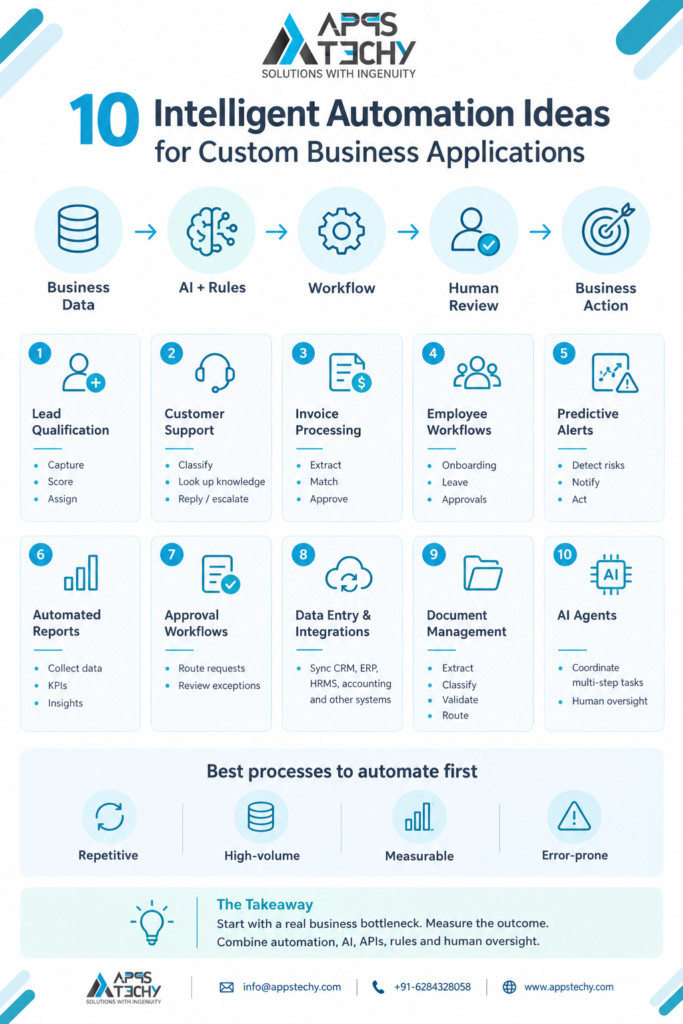
6. How Can AI Automate Business Reports?
Employees often spend hours collecting information from different systems before preparing weekly or monthly reports.
A custom application can automate much of this process.
It can:
- Collect data from connected systems
- Calculate KPIs
- Identify changes
- Detect unusual patterns
- Generate summaries
- Create dashboards
- Send reports to relevant users
Instead of asking, “Can we generate this report?”, teams can ask, “What does the latest business data tell us?”
Real-time analytics and automated insights are becoming important components of intelligent workflow systems.
7. How Can Businesses Automate Approval Workflows?
Approvals can become a major bottleneck when they depend on emails, spreadsheets, and manual follow-ups.
A custom application can automatically determine where a request should go based on business rules.
For example:
Expense submitted → Amount checked → Department identified → Manager approval → Finance approval → Payment workflow
More advanced applications can use AI to identify unusual requests and send them for additional review.
This creates a combination of rule-based automation and intelligent exception handling.
8. How Can Custom Applications Automate Data Entry?
Repeatedly entering the same information into different systems creates both wasted time and opportunities for errors.
API integrations can allow a custom application to automatically synchronize information between:
- CRM
- ERP
- HRMS
- Accounting software
- E-commerce platforms
- Payment systems
- Email platforms
- Internal databases
For example:
Website enquiry → CRM → Sales notification → Email sequence → Follow-up task
The employee doesn’t need to copy information from one system to another.
Connected architecture is becoming increasingly important as organizations move from isolated automation toward workflows that operate across multiple systems.
9. How Can AI Automate Document Management?
Businesses deal with contracts, invoices, applications, reports, forms, certificates, and other documents every day.
Intelligent document processing can help applications understand unstructured information.
A custom application could:
- Read uploaded documents
- Extract important fields
- Categorize documents
- Detect missing information
- Compare documents
- Search document contents
- Route documents to the right team
- Trigger follow-up workflows
For example:
Document uploaded → AI extracts information → Required fields checked → Compliance rule applied → Approval workflow triggered
This can be particularly valuable when employees spend significant time reviewing large numbers of documents.
10. How Can AI Agents Automate End-to-End Business Tasks?
One of the more significant developments in business automation is the move toward AI agents that can perform multiple connected steps rather than simply provide an answer.
For example, instead of an employee manually processing a new sales enquiry, an AI-enabled business application could potentially:
Read enquiry → Identify customer requirement → Check CRM → Research relevant account information → Prepare response → Create follow-up task → Request human approval
The important distinction is that the system is coordinating a workflow rather than performing one isolated task.
However, agentic automation should be designed with permissions, audit trails, security controls, and human review where decisions are sensitive. Current enterprise automation guidance increasingly emphasizes governance and human oversight as AI systems become more capable of taking actions across business processes.
What Is the Difference Between Automation and Intelligent Automation?
A traditional automation workflow generally follows predefined rules.
For example:
If a customer submits a form → send an email.
Intelligent automation can incorporate AI, contextual data, and adaptive decision-making.
For example:
Customer submits an enquiry → application understands the request → classifies the lead → checks customer history → recommends the next action → creates a task.
The two approaches are not competitors. A well-designed business application can combine deterministic business rules with AI where AI adds genuine value. SAP describes this direction as combining adaptive AI capabilities with deterministic systems and business rules.
Which Business Processes Should You Automate First?
Not every process needs AI.
A good starting point is a workflow that is:
- Repetitive
- High-volume
- Time-consuming
- Rule-driven
- Measurable
- Prone to manual errors
- Connected to multiple systems
For example, automating a repetitive approval or data-entry workflow may provide more immediate value than adding an AI chatbot simply because it is technically possible.
The practical question should be:
Which business bottleneck can automation measurably improve?
This outcome-focused approach is increasingly emphasized in current automation guidance.
How Should Intelligent Automation Be Built Into a Custom Business Application?
A typical intelligent automation architecture can include:
User Interface → Business Logic → Workflow Engine → AI/ML Layer → APIs → Databases → External Systems → Analytics
The exact architecture depends on the application.
For example, a custom SaaS platform may require AI-powered recommendations, while an internal operations application may benefit more from approval workflows and API integrations.
AppsTechy’s Custom Software Development Services can be used to build business applications around specific operational requirements rather than forcing a company to adapt its processes to generic software.
For businesses looking to automate complete workflows, Workflow Automation Services can also be connected with custom application development, APIs, AI, and business systems.
What Are the Benefits of Intelligent Automation?
When applied to the right processes, intelligent automation can help businesses:
- Reduce repetitive manual work
- Improve workflow consistency
- Reduce data-entry errors
- Speed up approvals
- Improve response times
- Connect disconnected systems
- Generate faster business insights
- Give employees more time for higher-value work
- Create better visibility into operations
However, the value should be measured against a baseline. Automation isn’t successful simply because a company has implemented AI; the important question is whether the redesigned process actually improves measurable business outcomes.
FAQs About Intelligent Automation
Intelligent automation combines workflow automation with technologies such as AI, machine learning, document processing, APIs, and analytics to automate business processes and support decision-making.
Depending on the business, it can automate lead management, customer support, invoicing, approvals, HR workflows, reporting, document processing, data synchronization, notifications, and many other repetitive processes.
No. Many processes can be automated using conventional rules and workflows. AI becomes useful when the process requires understanding unstructured information, classification, prediction, recommendations, or more adaptive decision-making.
AI workflow automation uses artificial intelligence within business workflows to analyze information, make recommendations, classify requests, generate content, or perform defined actions as part of a larger process.
Start with repetitive, high-volume, measurable processes where manual work creates delays, errors, or unnecessary operational costs.
Yes. APIs and integration layers can connect custom applications with CRM, ERP, HRMS, accounting, payment, communication, and other business systems.
Final Thoughts
The future of business automation isn’t simply about making individual tasks faster. It is about creating connected applications that can understand information, trigger workflows, coordinate systems, and help employees make better decisions.
From automated lead qualification and document processing to predictive alerts and AI-powered agents, there are many ways to introduce intelligence into a custom business application.
The key is to start with a real business problem, define a measurable outcome, and then choose the right combination of automation, AI, APIs, business rules, and human oversight.
If you’re planning to automate a business process or build an intelligent application, explore AppsTechy’s Custom Software Development Services and Workflow Automation Services. Have an automation idea in mind? Contact AppsTechy today to discuss your requirements and find the right approach for building a scalable, intelligent business application.